
Paxton10 - Desktop reader


- No software installation required, the desktop reader is ready for immediate use
- Simple USB connection
- Reads Paxton, MIFARE®, HID™ Prox, EM, FeliCa, NFC and DESFire transponders
- Quick and easy user registration
Product information "Paxton10 - Desktop reader"
Via - The Paxton10 desktop reader supports all transponder formats without the need for additional configuration, so you can easily add transponders to your system.
Installation - Connect the desktop reader to an available USB port and log in to the Paxton10 software via the web browser.
Operation - When a new transponder is held up to the reader, the system automatically loads a new user data record for adding user data and assigning access authorisations. If the held transponder already exists in the system, the data of the assigned user appears.
-
Download "Installation tips"
(376.16 KB)
To use a desktop reader
-
Download "Installation tips"
(1.31 MB)
Add a person
Manufacturer information
Paxton Deutschland GmbH
Paxton Deutschland GmbH
Westhoffstr. 128
D–48159 Münster
Germany
verkauf@paxton-gmbh.de
Login
Similar products

Hikvision DS-KD-ACF1/S – Unterputz-Halterung für 1 Modul Die Hikvision DS-KD-ACF1/S ist eine hochwertige Unterputz-Halterung zur Installation eines einzelnen Moduls der modularen Hikvision Türstationsserie. Sie bietet eine elegante und sichere Lösung für den bündigen Einbau in Wänden und sorgt so für ein sauberes, professionelles Erscheinungsbild. Die Halterung besteht aus einer robusten Unterputzdose aus Edelstahl oder Kunststoff und einer passgenauen Metall-Frontplatte für ein Modul. Alle erforderlichen Montageteile sind im Lieferumfang enthalten, wodurch die Installation einfach und zeitsparend gelingt. Ideal geeignet für private und gewerbliche Anwendungen, gewährleistet die DS-KD-ACF1/S eine langlebige und zuverlässige Montage der Türstation. Technische Details: Funktion: Unterputzhalterung für 1 Modul Material: Edelstahl oder Kunststoff mit Metallfrontplatte Montageart: Unterputz Kompatibilität: Hikvision modulare Türstationen Lieferumfang: Unterputzdose, Frontplatte,

Hikvision DS-1604ZJ-BOX – Wandarm mit Anschlussbox für Speed Dome Kameras Die Hikvision DS-1604ZJ-BOX ist eine besonders robuste und funktionale Wandarmhalterung mit integrierter Anschlussbox, die speziell für die Montage von Hikvision Speed Dome Kameras entwickelt wurde. Sie bietet eine stabile, witterungsbeständige und langlebige Befestigungslösung für den professionellen Einsatz in Innen- und Außenbereichen. Gefertigt aus einer Kombination von hochwertiger Aluminiumlegierung und Stahl, überzeugt die Halterung durch ihre außergewöhnliche Stabilität und Korrosionsbeständigkeit. Die integrierte Anschlussbox ermöglicht eine geschützte und ordentliche Kabelführung, wodurch die Installation erleichtert und das System vor Umwelteinflüssen geschützt wird. Das Design in Hikvision-Weiß sorgt für ein professionelles, einheitliches Erscheinungsbild, das sich perfekt in verschiedene Installationsumgebungen einfügt. Mit ihrer massiven Bauweise eignet sich die DS-1604ZJ-BOX ideal für gewerbliche Gebäude, Industrieanlagen, Außenfassaden und öffentliche Einrichtungen, bei denen Sicherheit, Langlebigkeit und Stabilität höchste Priorität haben. Die Hikvision DS-1604ZJ-BOX Wandarmhalterung mit Anschlussbox vereint Funktionalität, Sicherheit und modernes Design und bietet eine professionelle, saubere und langlebige Lösung für die Montage und Verkabelung von Speed Dome Kameras.
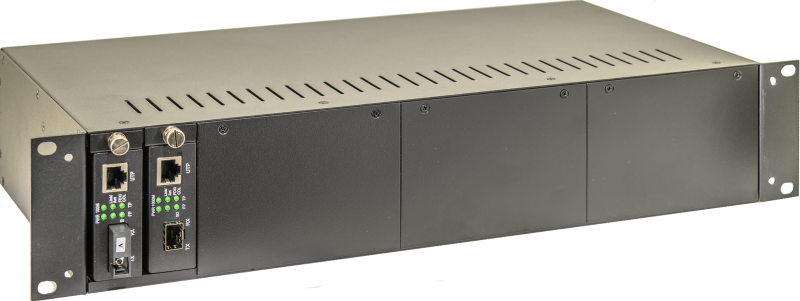
The LO-9500-R2 is a 19" subrack for holding media converters of the types LO-9500-xy. Up to 14 media converters can be mounted in the subrack . The redundant power supply ensures high availability . The media converters are easy to install. The LO-9500-R2 is supplied with all the necessary mounting accessories. Technical specifications General properties Supply voltage Two redundant power supply units included in the scope of delivery 2 x 110 - 230VAC 50-60Hz Power consumption Max. 50W at full Equipped with 14 media converters MTBF Operating temperature -20°C to +50°C Dimensions 230 x 490 x 90mm (LxWxH) 19", 2U Weight 4 kg Types/features LO-9500-S Incl. accessories: 2 power cables 14 slide-in holders for media converters LO-9500-xy Blanking plates, 3x4 slots and 2 x 1 slot
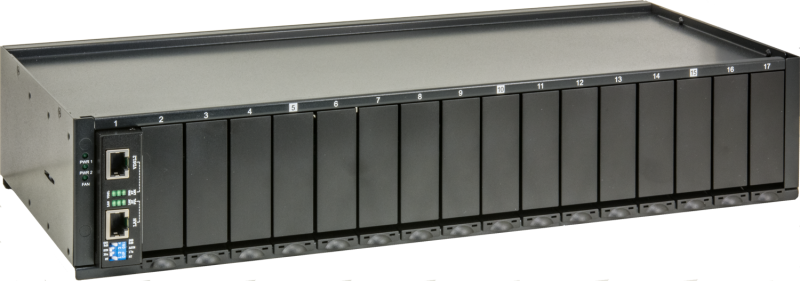
The PD-R2 is a 2U high 19" housing with 17 slots. The enclosure provides an economical solution for low density VDSL2 LAN Extender installations where no management functions are required. Each 100M VDSL2 LAN Extender can be used as a standalone device or installed in the PD-R2 chassis. An AC power supply is built into the subrack. The built-in fan ensures that the temperatures in the rack remain within the permissible operating range . Technical data General properties Supply voltage 230VAC, IEC plug Power consumption Depending on the assignment with VDSL modems Base load: 10W Per modem: 4.5W Maximum power consumption with 17 modems: 90W MTBF Operating temperature 0°C ... 50°C Power loss 307BTU/h, at maximum occupancy Dimensions 199mm x 476mm x 88mm, (LxWxH) Weight Gross weight: 6.2kg Net weight: 5.2kg

i-PRO WV-QDC503CN – Clear Dome Cover mit ClearSight-Beschichtung für WV-X(S)65xxN / WV-X85xxN / WV-S65340-xx Netzwerk-Kameras Der WV-QDC503CN ist ein Clear Dome Cover von i-PRO mit integrierter ClearSight-Beschichtung, das speziell für die Netzwerk-Kameraserien WV-X(S)65xxN, WV-X85xxN sowie WV-S65340-xx entwickelt wurde. Diese transparente Dome-Abdeckung bietet einen umfassenden Schutz der Kameraoptik und sorgt zugleich für eine dauerhaft klare Sicht – selbst bei schwierigen Witterungs- oder Umgebungsbedingungen. Dank der ClearSight-Beschichtung werden störende Effekte durch Wasser, Schmutz oder Kondensate auf der Kuppeloberfläche erheblich reduziert. Dies unterstützt eine konstant hohe Bildqualität ohne Beeinträchtigungen durch Tropfen, Schlieren oder Ablagerungen, die sonst in Außen- oder semi-offenen Installationsbereichen auftreten können. Die klare Ausführung des Dome Covers gewährleistet gleichzeitig eine unverfälschte optische Darstellung – Schärfe, Farbtreue und Detailgenauigkeit der Kameraaufnahmen bleiben vollständig erhalten. Der WV-QDC503CN ist passgenau auf die genannten i-PRO Kameramodelle abgestimmt und lässt sich sicher und werkzeugfreundlich montieren, ohne zusätzlichen Anpassungsaufwand. Sein unauffälliges, transparentes Design fügt sich harmonisch in unterschiedlichste Überwachungsumgebungen ein – von Innenräumen über Eingangs- und Empfangsbereiche bis hin zu geschützten Außeninstallationen.

Hikvision DS-1297ZJ – Deckenhalterung aus Aluminiumlegierung Die DS-1297ZJ ist eine hochwertige Deckenhalterung von Hikvision, die speziell für die sichere und stabile Montage von Überwachungskameras an Decken entwickelt wurde. Gefertigt aus einer robusten Aluminiumlegierung bietet sie eine hohe mechanische Stabilität bei gleichzeitig geringem Eigengewicht. Die Ausführung in klassischem Weiß sorgt für eine dezente und professionelle Optik, die sich harmonisch in nahezu jede Innenraumumgebung einfügt. Durch ihre stabile Konstruktion gewährleistet die Halterung eine dauerhaft sichere Befestigung der Kamera, auch im Dauerbetrieb. Sie eignet sich ideal für den Einsatz in Büros, Verkaufsräumen, öffentlichen Einrichtungen oder Industrieumgebungen, in denen eine zuverlässige und saubere Deckenmontage gefordert ist. Die DS-1297ZJ überzeugt durch ihre langlebige Materialqualität, einfache Montage und hohe Belastbarkeit. Sie ist die ideale Lösung für professionelle Videoüberwachungsinstallationen, bei denen Wert auf Sicherheit, Stabilität und eine optisch ansprechende Integration gelegt wird.

Hikvision DS-1281ZJ-DM23 – Schräge Montagebox für Dome-Kameras Die Hikvision DS-1281ZJ-DM23 ist eine robuste und funktionale Montagebox mit schräger Ausrichtung, die speziell für die Installation von Hikvision Dome-Kameras entwickelt wurde. Sie ermöglicht eine optimale Kamerapositionierung an Wänden oder Decken mit ungünstigem Winkel und sorgt damit für eine präzise Überwachungsausrichtung in jeder Umgebung. Gefertigt aus hochwertiger Aluminiumlegierung bietet die DS-1281ZJ-DM23 eine hohe Stabilität, Korrosionsbeständigkeit und Witterungsfestigkeit, was sie ideal für den Einsatz im Innen- und Außenbereich macht. Die schräge Form erlaubt eine verbesserte Anpassung des Blickwinkels, sodass auch schwer einsehbare Bereiche zuverlässig überwacht werden können. Zusätzlich verfügt die Montagebox über eine integrierte Kabelführung, die eine geschützte, saubere und ordentliche Installation ermöglicht. Das Hikvision-Weiß sorgt für ein professionelles, dezentes Erscheinungsbild, das sich harmonisch in jede Architektur einfügt. Die Hikvision DS-1281ZJ-DM23 schräge Montagebox kombiniert Funktionalität, Langlebigkeit und Design und bietet eine professionelle, sichere und flexible Lösung für die Installation von Dome-Kameras – ideal für Gewerbegebäude, Eingangsbereiche, Industrieanlagen oder öffentliche Einrichtungen.

Hikvision DS-1603ZJ – Wandarmhalterung für Speed Dome Kameras Die Hikvision DS-1603ZJ ist eine hochwertige und besonders stabile Wandarmhalterung, die für die Montage von Hikvision Speed Dome Kameras entwickelt wurde. Sie bietet eine zuverlässige, witterungsbeständige und langlebige Befestigungslösung für professionelle Überwachungssysteme im Innen- und Außenbereich. Gefertigt aus robuster Aluminiumlegierung, überzeugt die DS-1603ZJ durch ihre hohe Belastbarkeit, Korrosionsbeständigkeit und ein durchdachtes Design, das die Installation besonders einfach und sicher macht. Die Halterung verfügt über eine integrierte Kabelführung, die eine geschützte und saubere Verlegung der Kabel ermöglicht und so ein professionelles Erscheinungsbild gewährleistet. Das elegante Hikvision-Weiß fügt sich harmonisch in jede Umgebung ein und sorgt für eine ästhetisch ansprechende Integration in moderne Sicherheitsinstallationen. Mit ihrer stabilen Konstruktion ist die DS-1603ZJ ideal für gewerbliche Gebäude, Industrieanlagen, öffentliche Einrichtungen oder Außenfassaden, bei denen Zuverlässigkeit und Langlebigkeit im Vordergrund stehen. Die Hikvision DS-1603ZJ Wandarmhalterung vereint Funktionalität, Robustheit und Design und bietet eine professionelle, wetterbeständige und sichere Lösung für die Montage von Speed Dome Kameras.

Hikvision DS-1258ZJ (Black) – Wandhalterung in Schwarz für Hikvision Dome-Kameras Die Hikvision DS-1258ZJ (Black) ist eine kompakte und robuste Wandhalterung, die speziell für die sichere Montage von Hikvision Dome-Kameras entwickelt wurde. Gefertigt aus hochwertigem Kunststoff, bietet sie eine zuverlässige, stabile und langlebige Befestigungslösung für den Einsatz in Innenbereichen. Mit ihrem schlichten und modernen Design in Hikvision-Schwarz fügt sich die Halterung harmonisch in jede Umgebung ein und sorgt für eine dezente, professionelle Optik, besonders bei dunklen Wand- oder Deckenflächen. Sie ermöglicht eine präzise Ausrichtung der Kamera und gewährleistet eine einfache, saubere Installation. Dank der durchdachten Bauweise bietet die DS-1258ZJ (Black) eine platzsparende und stabile Befestigung, die ideal für Überwachungsanwendungen in Büros, Eingangsbereichen, Verkaufsräumen oder öffentlichen Einrichtungen geeignet ist. Die Hikvision DS-1258ZJ (Black) Wandhalterung kombiniert Funktionalität, Design und Zuverlässigkeit und ist die perfekte Lösung für Anwender, die eine ästhetisch ansprechende und sichere Kameramontage im Innenbereich wünschen.

Hikvision DS-1473ZJ-155 (Black) – Wandhalterung in Schwarz für Hikvision-Kameras Die Hikvision DS-1473ZJ-155 (Black) ist eine stabile und elegante Wandhalterung, die speziell für die Montage von Hikvision-Kameras entwickelt wurde. Gefertigt aus hochwertiger Aluminiumlegierung mit einer Oberflächenbeschichtung, bietet sie hervorragenden Korrosionsschutz, hohe Belastbarkeit und lange Lebensdauer – ideal für den Einsatz im Innen- und Außenbereich. Mit ihren präzisen Abmessungen und der robusten Bauweise ermöglicht die Halterung eine sichere, saubere und professionelle Installation. Der integrierte Kabeldurchlass sorgt für eine geschützte Kabelführung, während das praktische Kappendesign die Montage vereinfacht und Installationszeiten verkürzt. Das mattschwarze Design sorgt für eine unauffällige und moderne Optik, die sich besonders für dunkle Fassaden, dezente Installationen oder anspruchsvolle architektonische Umgebungen eignet. Durch die Kombination von Funktionalität, Stabilität und Design ist die DS-1473ZJ-155 (Black) ideal für Gewerbegebäude, Industrieanlagen und öffentliche Einrichtungen geeignet. Die Hikvision DS-1473ZJ-155 (Black) Wandhalterung bietet eine professionelle, langlebige und wetterbeständige Lösung für die sichere Montage von Kameras und kombiniert höchste Qualität mit einem modernen, diskreten Erscheinungsbild.

This industrial media converter with management was specially developed for applications with high data loads, such as video over IP or video streaming. The compact design, wide temperature range and high flexibility make this media converter ideal for remote locations. The media converter has an optical SFP port with 100/1000FX and two copper ports with 10/100/1000TX, which supports PoE 802.3af/at/bt up to 90W per port and 120W. The management functions allow the PoE to be controlled, including monitoring of the connected PDs. The cables connected to can also be monitored remotely. The media converter can be easily mounted on a top-hat rail using the supplied mounting accessories. Technical data General properties Supply voltage 2 x 48-56VDC Power consumption Max. 4W, without PoE MTBF Operating temperature -40°C to +75°C Dimensions 105 x 38 x 84 (HxWxL), all dimensions without connector Weight Net 0.45 kg Interfaces Copper ports 2 x 10/100/1000TX with PoE++ Per port max. 90W Total over both ports 120W Fibre optic ports 1 x 100/1000FX SFP We recommend the use of our barox SFPs. The compatibility of our devices with SFPs from other manufacturers is not tested or guaranteed by us. Network features Management Lite Management User Management LAN settings Relay alarm settings PoE Settings User Configuration Path GUI DIP Switches PoE Management Device alive check PoE power control PoE status PoE Configuration PoE Scheduling PoE status display Link speed per TX port, link speed SFP port, PoE output per port, data transmission Security FCC Class A, CE Types/features PD-BTPMC102-GE Without SFP Without power supply PoE, PoE+ and PoE++ up to 90W per port Total PoE power over both ports 120W Mounting accessories Bracket for top-hat rail mounting
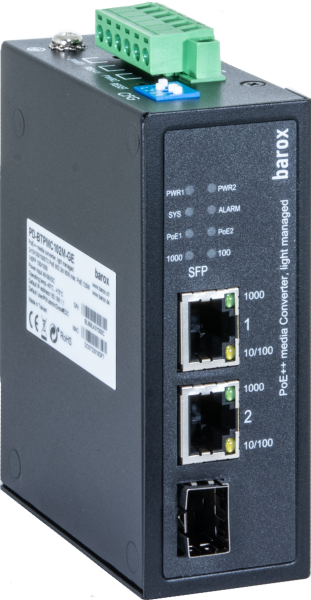
This industrial media converter with management was specially developed for applications with high data loads, such as video over IP or video streaming. The compact design, wide temperature range and high flexibility make this media converter ideal for remote locations. The media converter has an optical SFP port with 100/1000FX and two copper ports with 10/100/1000TX, which supports PoE 802.3af/at/bt up to 90W per port and 120W. The management functions allow the PoE to be controlled, including monitoring of the connected PDs. The cables connected to can also be monitored remotely. The media converter can be easily mounted on a top-hat rail using the supplied mounting accessories. Technical data General properties Supply voltage 2 x 48-56VDC Power consumption Max. 4W, without PoE MTBF Operating temperature -40°C to +75°C Dimensions 105 x 38 x 84 (HxWxL), all dimensions without connector Weight Net 0.45 kg Interfaces Copper ports 2 x 10/100/1000TX with PoE++ Per port max. 90W Total over both ports 120W Fibre optic ports 1 x 100/1000FX SFP We recommend the use of our barox SFPs. The compatibility of our devices with SFPs from other manufacturers is not tested or guaranteed by us. Network features Management Lite Management User Management LAN settings Relay alarm settings PoE Settings User Configuration Path GUI DIP Switches PoE Management Device alive check PoE power control PoE status PoE Configuration PoE Scheduling PoE status display Link speed per TX port, link speed SFP port, PoE output per port, data transmission Security FCC Class A, CE Types/features PD-BTPMC102-GE Without SFP Without power supply PoE, PoE+ and PoE++ up to 90W per port Total PoE power over both ports 120W Mounting accessories Bracket for top-hat rail mounting